

1440p gaming is where a laptop can feel close to a proper desktop setup without becoming a huge 18-inch machine. It is also where vague “RTX 50-series laptop” shopping advice fails. Two laptops with the same GPU label can have very different screen quality, memory, cooling, power limits, and price.
This guide will focus on US gamers who want a laptop for modern single-player games, competitive games, and everyday use at 2560×1600 or 2560×1440. For the full component breakdown, see our Gaming Laptop Buying Guide.
How we will choose the final picks
Each final recommendation must clear five checks: the exact CPU, GPU, RAM, storage, display resolution and refresh rate must match the listing; the seller and fulfillment must be suitable; independent coverage must apply to the same configuration or be clearly qualified; the price must make sense against competing laptops; and the product must still be available to US buyers.

That avoids a common problem with gaming-laptop lists: a review may cover a high-power GPU and a premium screen while the linked store listing has a lower-power GPU, a different display, or a third-party upgrade bundle.
What a good 1440p gaming laptop needs
For this class, the GPU matters first, but it is not the only decision. A balanced configuration should pair a capable GPU with at least 16GB of dual-channel memory, a 1TB SSD where possible, and a display that is genuinely suited to gaming. A higher-resolution panel is not automatically better if the GPU, refresh rate, brightness, or response behavior does not match the games you play.
Cooling and GPU power limits are just as important. A thinner chassis can be attractive, but performance can vary when a manufacturer gives the same GPU less power or uses a quieter thermal profile. That is why this guide will name the configuration, not just the laptop family.
Top 1440p gaming laptop picks
Affiliate disclosure: As an Amazon Associate I earn from qualifying purchases.
| Pick | Best for | Configuration checked | Trade-off |
|---|---|---|---|
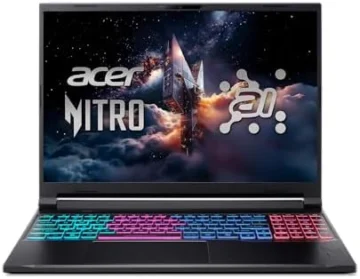 |
Balanced 1600p gaming | Ryzen AI 7 350 · RTX 5070 · 16GB · 1TB · WQXGA 180Hz | 16GB RAM is enough to start, but less headroom than the premium pick. |
 |
Premium performance | Core Ultra 9 275HX · RTX 5070 Ti · 32GB · 1TB · 2.5K 240Hz | Costs substantially more; choose it for the stronger GPU tier and display, not only the badge. |
Best balanced 1440p gaming laptop: Acer Nitro V 16S AI
Choose the ANV16S-61-R3Z0 if you want a high-refresh 1600p screen and an RTX 5070 in a more sensible performance tier. It is the better fit for gamers who want smooth AAA and competitive play without paying premium-laptop money for features they will not use.
Best balanced pick
For gamers who want a high-refresh 1600p setup without jumping straight to a premium-tier price.
Check current availability on Amazon
Opens Amazon in a new tab · Price and availability can change
Best premium performance pick: ASUS ROG Strix G16
Choose the G615LR-AS96 when you want a more aggressive 1440p setup: an RTX 5070 Ti, 32GB of memory, and a 2.5K 240Hz display. It is for players who care about higher settings, a faster panel, and keeping more games and apps open at once.
Premium performance pick
For higher settings, a faster 2.5K panel, and more multitasking headroom.
Check current availability on Amazon
Opens Amazon in a new tab · Price and availability can change
Why there is no “cheap” pick here
We are not forcing a third option just to fill a list. A 1440p gaming recommendation needs the right display, GPU configuration, seller, and current availability. A cheaper product that misses those checks is not value for a gamer.
Before you buy
Check the listing for the exact model number, GPU, display resolution, refresh rate, memory capacity, storage capacity, seller, and return policy. Do not assume that every version of a laptop line has the same panel or gaming performance. If a deal looks unusually cheap, confirm whether it is new, refurbished, open-box, or sold through a third party.
When the final picks are added, every commercial link will be clearly disclosed. Product prices and availability will be checked close to publication rather than hard-coded into the article.