

Buying a gaming laptop in 2026 is mostly about getting the balance right rather than chasing the biggest number on the spec sheet. A fast GPU can be held back by a weak cooling system. A high-resolution display can be wasted if the graphics hardware cannot drive it properly. Extra RAM may help multitasking, while extra storage often matters more than a small difference in SSD benchmark speed.
This guide focuses on the specifications that actually change the gaming experience: GPU power, CPU class, RAM, storage, display quality, cooling, upgradeability, ports, battery behavior, weight, and the compromises that come with thin designs.
Start with the GPU, but do not stop at the GPU name
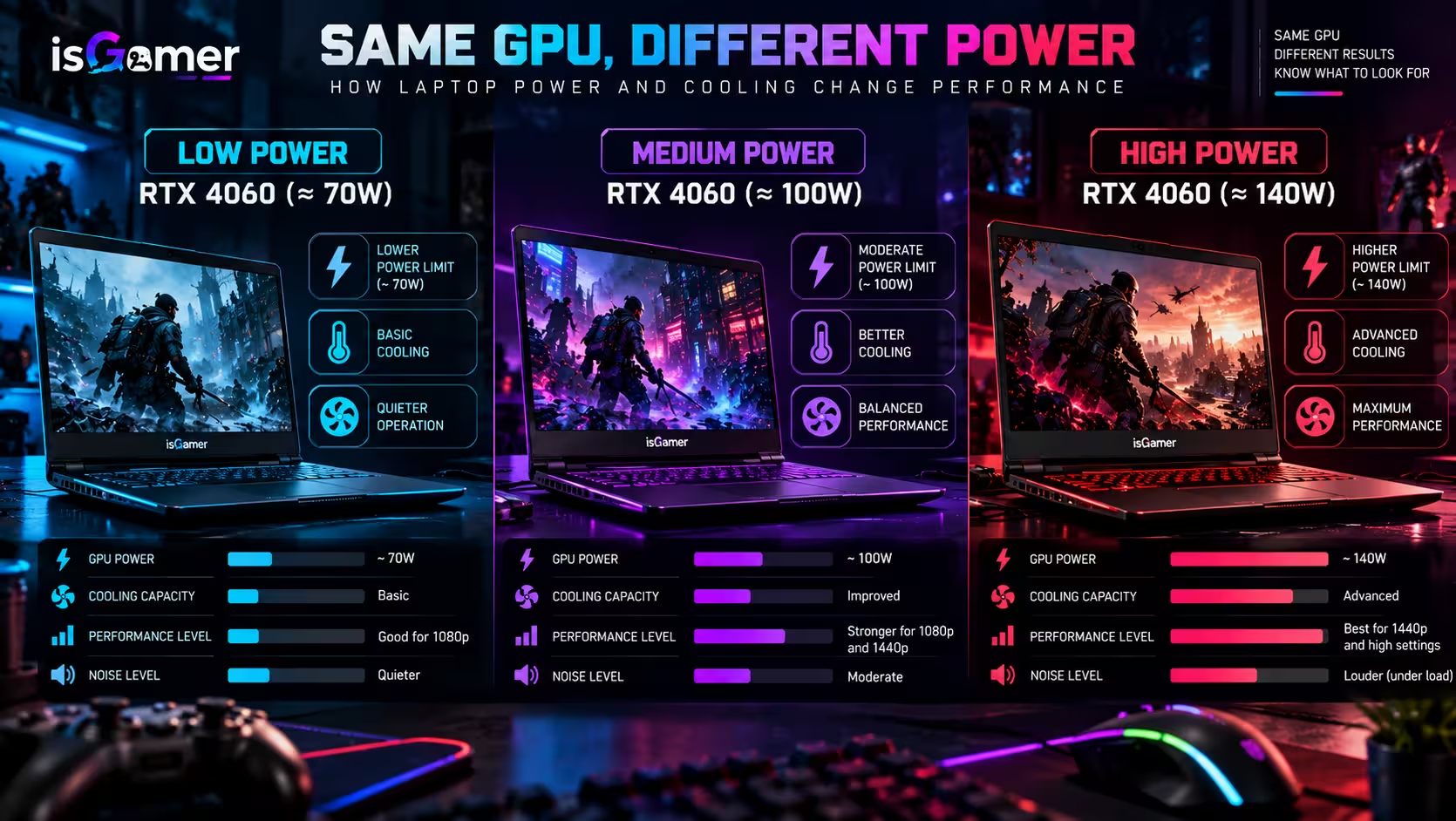
The GPU is still the most important performance component in most gaming laptops, especially for modern AAA games, higher resolutions, ray tracing, and high-refresh gaming.

But laptop graphics are not as simple as comparing model names. The same GPU can operate at different power levels depending on the laptop design. NVIDIA’s current GeForce RTX 50 Series Laptop GPUs, for example, span different GPU subsystem power ranges depending on the model and configuration. That means two laptops carrying the same GPU name can behave differently in practice.
Our gaming laptop GPU and TGP guide explains this in detail, including why TGP, VRAM, cooling, and screen resolution should be evaluated together.
As a rule, compare the exact laptop configuration rather than assuming that every version of a GPU performs the same. Look for the GPU power limit, VRAM amount, cooling design, and independent performance testing of the actual model you are considering.
Match the GPU to the resolution you actually want to use
Resolution affects both image quality and GPU workload. A 1080p or 1200p display is easier to drive at high frame rates. A 1440p-class or 1600p panel can look noticeably sharper, especially on 16-inch laptops, but it asks more from the GPU.
4K panels can make sense for content creation, media work, or premium visual quality, but gaming at native 4K is much more demanding. If the GPU cannot sustain the frame rate you want, you may end up relying more heavily on upscaling technologies or lowering settings.
That is why the display and GPU should be chosen as a pair. Intel’s gaming guidance also recommends balancing refresh rate, resolution, screen size, and overall system performance rather than chasing a single display specification.
Do not overbuy the CPU
The CPU matters for high frame rates, simulation-heavy games, strategy titles, background tasks, streaming, and general system responsiveness. However, spending heavily on the fastest processor can be poor value if the laptop uses a mid-range GPU or if your games are mostly graphics-limited.
For a balanced gaming laptop, prioritize a modern CPU with enough cores and threads for your workload, then make sure the GPU receives enough of the budget. Higher-end processors become more valuable when you also stream, edit video, compile code, run virtual machines, or play games that place unusually heavy loads on the CPU.
The key is balance. A premium CPU paired with a weaker GPU does not automatically produce a better gaming laptop than a slightly lower-tier CPU paired with a stronger graphics configuration.
16GB of RAM is the practical baseline, 32GB gives more headroom
Windows 11 itself has much lower minimum memory requirements, but operating-system minimums are not gaming recommendations. For a modern gaming laptop, 16GB is a much more realistic starting point for everyday gaming and general use.
32GB becomes more attractive if you keep many browser tabs open, stream, record gameplay, use creative software, run mods, or simply want more multitasking headroom.
Our full guide to how much RAM and storage you need for gaming covers 16GB vs 32GB, storage capacity, upgradeability, and what to check before buying.
Also check how the memory is installed. Some laptops use soldered RAM, some combine soldered memory with one upgradeable slot, and others provide two replaceable SO-DIMM slots. Upgradeability can matter more than buying the maximum amount of memory on day one.
Storage capacity matters more than most buyers expect
Modern games can consume a large amount of space, and a 512GB SSD can feel restrictive once Windows, launchers, updates, and several large games are installed.
For many buyers, 1TB is the most comfortable mainstream starting point. 2TB is useful if you keep a large game library installed, work with video files, or do not want to manage storage frequently.
Also look for a second M.2 slot. A laptop with an extra SSD slot can be easier and cheaper to expand later than one with a single drive bay.
Do not assume that a small difference in advertised NVMe speed will transform gaming performance. Once you are already using a modern SSD, capacity, thermals, reliability, and upgrade options can be more important for everyday gaming than synthetic peak transfer numbers.
The display changes how powerful hardware actually feels
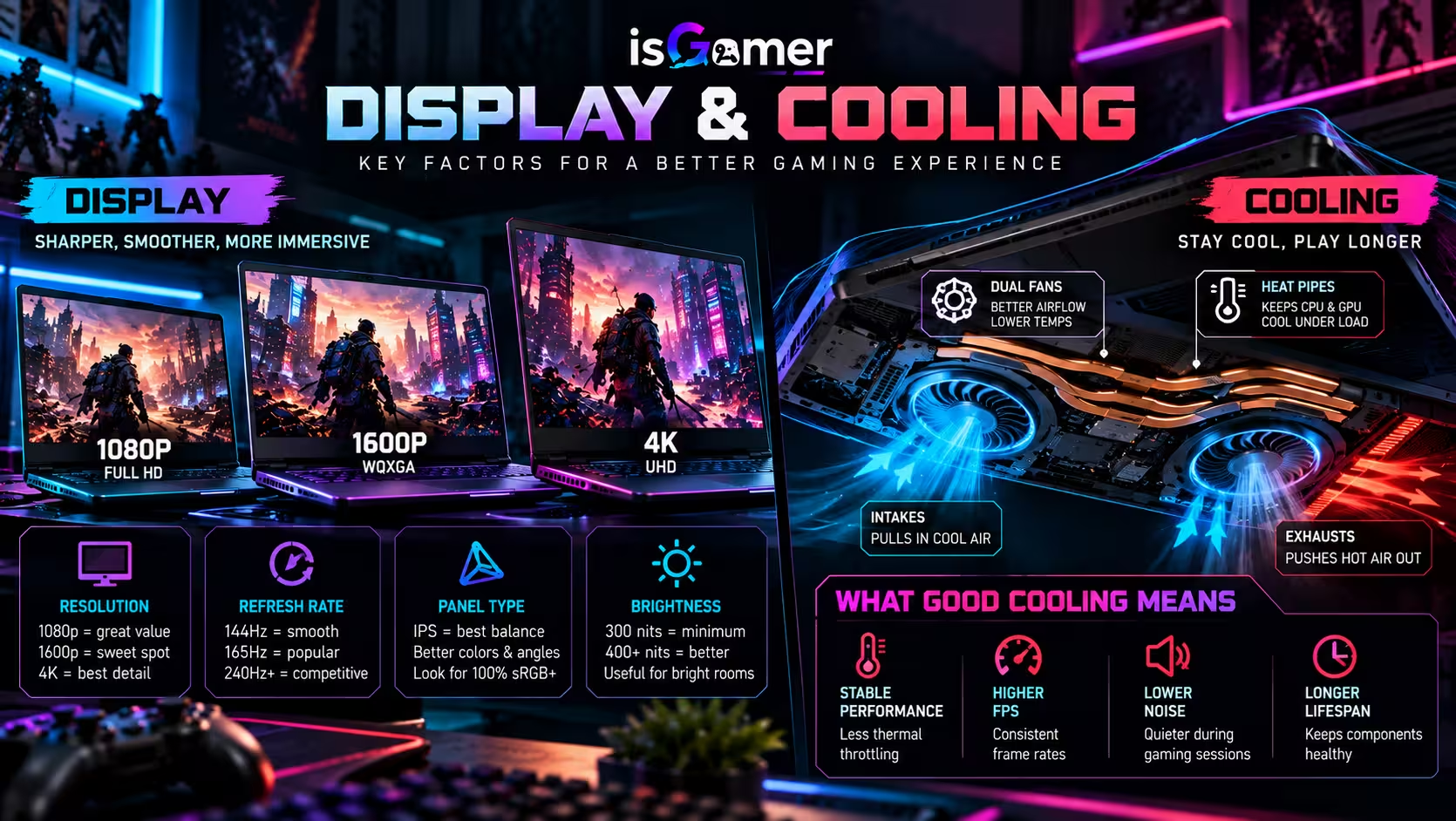
A gaming laptop display is more than resolution and refresh rate. Panel type, brightness, color coverage, response behavior, VRR support, aspect ratio, and screen size all affect the experience.
High-refresh panels can make competitive games feel smoother, but only when the laptop can produce enough frames to benefit from them. Intel notes that the CPU, GPU, and display must work together for higher refresh rates to be useful.
For a deeper comparison of 1080p, 1600p, high-refresh displays, OLED vs IPS, VRR, brightness, and thermals, read our gaming laptop displays and cooling guide.
Cooling can decide whether the laptop sustains its performance
A gaming laptop can only maintain high CPU and GPU power when its cooling system can remove the heat produced under load.
Cooling designs vary widely. Some laptops rely on traditional heat pipes, while higher-end models may use vapor chambers, larger heatsinks, multiple fans, and more elaborate airflow paths.
Thin designs often involve harder thermal compromises because there is less physical room for fans, heatsinks, and airflow. That does not mean every thick laptop is better, but it does mean chassis design matters.
When comparing reviews, pay attention to sustained gaming performance, fan noise, surface temperatures, and the performance mode used during testing. One short benchmark does not tell you how the laptop behaves after a long gaming session.
DLSS and frame generation help, but they do not replace good hardware
Modern laptop GPUs increasingly rely on advanced rendering technologies to improve performance. NVIDIA’s current RTX 50 Series Laptop GPUs are based on the Blackwell architecture and support the company’s latest DLSS features.
Upscaling and frame-generation technologies can make higher resolutions and demanding settings more practical, but they should not be used as an excuse to ignore native GPU capability, VRAM, thermals, or latency.
Think of these technologies as tools that extend the usefulness of the hardware rather than as replacements for choosing the right hardware in the first place.
Check VRAM before you assume a GPU tier is enough
VRAM holds textures, frame buffers, geometry data, and other assets used by the GPU. Higher resolutions and higher-quality texture settings can increase VRAM demand.
The amount you need depends on the games, settings, resolution, and how long you plan to keep the laptop. There is no single number that guarantees future-proofing, but comparing VRAM capacity is important when two graphics options sit close together in price.
This is especially relevant with gaming laptops because the GPU is normally not upgradeable later.
Battery life is usually a secondary gaming specification
Gaming laptops are portable, but most high-performance gaming still makes more sense while plugged into power. On battery, many laptops reduce CPU and GPU power to control heat and extend runtime.
Battery capacity still matters for browsing, school, work, travel, and media playback, but do not assume that a large battery means the laptop will deliver full gaming performance away from the charger.
Also consider the charger itself. Some high-performance laptops use large power adapters that add meaningful weight to a backpack.
Ports can matter more after you buy the laptop
Ports are easy to ignore until you need to connect an external monitor, mouse, keyboard, headset, Ethernet cable, capture device, or external SSD.
Look at the exact port selection, not just the number of ports. Check for USB-A, USB-C, video output, Ethernet, audio, and the charging or data capabilities of each USB-C port.
If you plan to use an external high-refresh display, verify that the available display output supports the resolution and refresh rate you intend to use.
Wi-Fi, Ethernet, and latency still matter
For online gaming, a strong network connection can matter as much as raw frame rate. Ethernet remains useful when you want the most consistent wired connection, while modern Wi-Fi can be convenient and fast when the router and environment support it.
Do not buy a laptop based on the newest wireless label alone. Antenna design, drivers, router quality, distance, interference, and your internet connection all affect real-world results.
Keyboard, trackpad, speakers, and webcam are not just extras
Performance specs dominate gaming laptop marketing, but the parts you touch every day matter too.
Keyboard layout, key travel, arrow-key size, numpad availability, RGB control, trackpad quality, speaker placement, webcam quality, and microphone behavior can change whether a laptop feels good outside gaming.
This matters even more if the laptop will replace a desktop for work or study.
Upgradeability can extend the useful life of the laptop
Most laptop CPUs and GPUs are not replaceable, so the parts you can upgrade become more important.
Check whether the RAM is replaceable, whether there is a second SSD slot, how difficult the bottom panel is to remove, and whether opening the laptop affects warranty terms in your region.
A slightly more expensive laptop with accessible RAM and storage can sometimes be a better long-term purchase than a cheaper sealed configuration.
Thin and light vs thicker performance-focused laptops
There is no universally correct chassis size. Thin gaming laptops are easier to carry and can look cleaner in mixed work-and-gaming environments. Thicker systems often have more room for cooling, larger batteries, more ports, or higher sustained power.
The better choice depends on how often you move the laptop, whether you use it on a desk most of the time, how much fan noise you tolerate, and how much performance you expect under long gaming sessions.
What matters most by type of gamer
Competitive gaming: prioritize high frame rates, a responsive high-refresh display, strong CPU performance, low-latency networking, and cooling that can sustain performance.
AAA single-player gaming: prioritize the GPU, VRAM, display quality, cooling, and enough SSD capacity for large games.
Gaming plus school or work: balance performance with battery life, weight, webcam quality, keyboard comfort, and noise in lighter workloads.
Gaming plus content creation: consider 32GB of RAM, more storage, a color-accurate display, a stronger CPU, and a GPU with enough VRAM for your creative applications.
A practical gaming laptop checklist for 2026
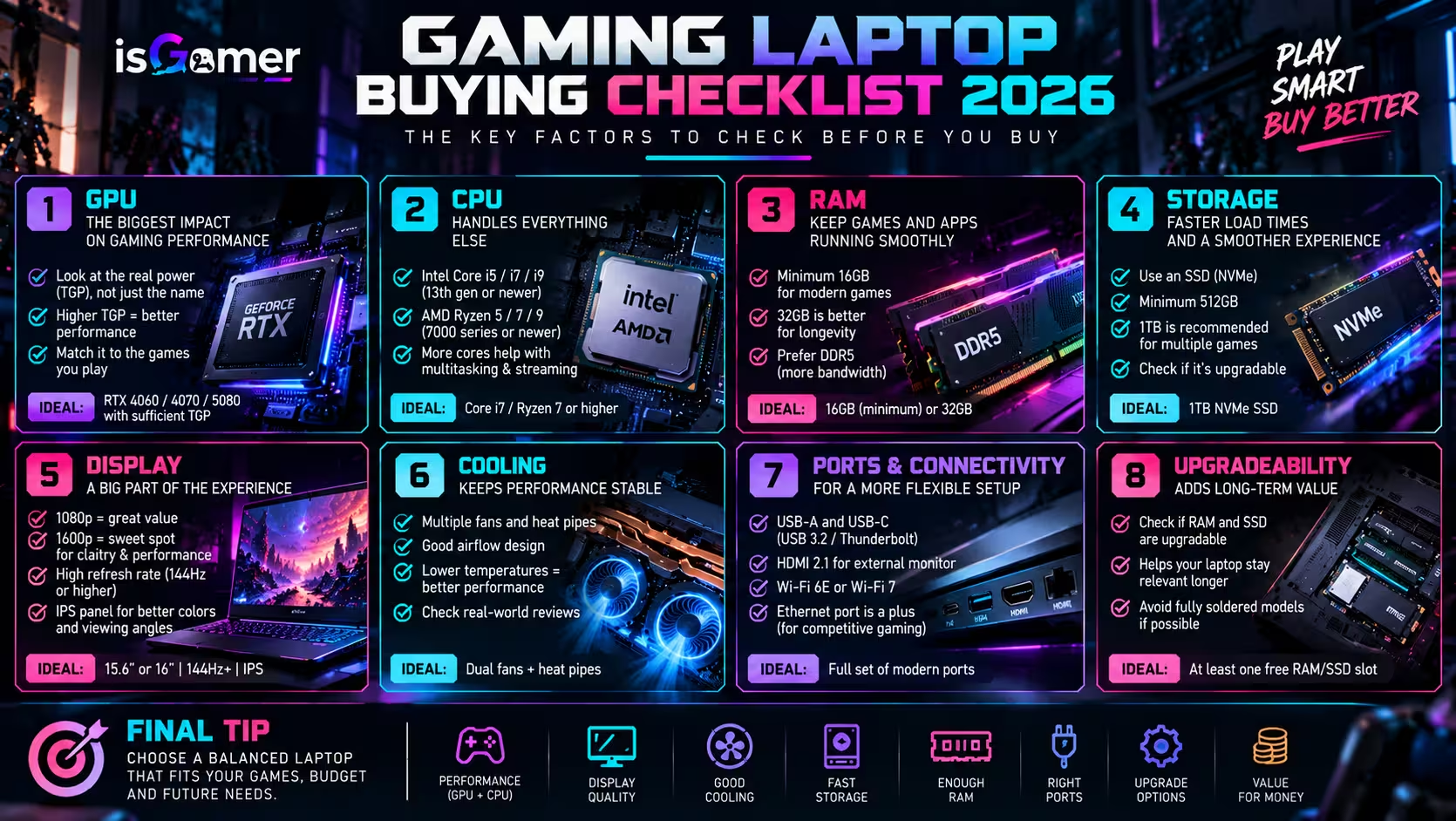
- Check the exact GPU model and power configuration.
- Match the GPU to the laptop’s native display resolution.
- Choose a CPU that fits your gaming and productivity workload without starving the GPU budget.
- Treat 16GB RAM as a practical gaming baseline and consider 32GB for heavier multitasking.
- Prefer enough SSD capacity for your actual game library, with 1TB being a comfortable starting point for many buyers.
- Check for RAM and SSD upgrade options.
- Compare refresh rate, VRR, brightness, panel type, and color quality instead of refresh rate alone.
- Look at sustained thermals and fan noise, not just short benchmark results.
- Verify the ports you need for external displays and accessories.
- Consider total travel weight, including the charger.
- Read reviews of the exact configuration you plan to buy.
The best gaming laptop is the most balanced one for your use
There is no single specification that makes a gaming laptop good. The strongest purchases are balanced systems where the GPU, CPU, display, cooling, memory, storage, and chassis design make sense together.
Start with the games you actually play, the resolution and frame rate you want, and how portable the machine needs to be. Then compare complete laptop configurations rather than isolated component names.
If you understand GPU power, choose enough RAM and storage, match the display to the graphics hardware, and verify that the cooling system can sustain the performance, you are far less likely to overpay for specs that look impressive on paper but do not improve the experience you actually care about.
More Gaming Laptop Guides
Choosing the right laptop is easier when you compare the details together. Read our gaming laptop GPU and TGP guide, then check how much RAM and storage you need for gaming. For the final display decision, see our guide to gaming laptop displays and cooling.