


A gaming laptop can have a powerful GPU and still feel like a disappointing purchase if the screen is dull, the fans are constantly loud, or the chassis cannot keep temperatures under control. Display quality and cooling are not secondary details. They shape how the laptop actually feels every time you play.
The right balance depends on what you play. Competitive games benefit from higher refresh rates and responsive panels, while visually demanding single-player games may benefit more from higher resolution, stronger contrast, and better color reproduction. Cooling matters in both cases because the CPU and GPU can only sustain their intended performance when the laptop can remove heat effectively.
If you are still comparing graphics configurations, our gaming laptop GPU and TGP guide explains why GPU power limits, VRAM, and cooling should be evaluated together. If you are also deciding on memory and storage, see our guide to RAM and storage for gaming laptops.

Start with resolution, not just screen size
Resolution determines how many pixels the panel displays. Higher resolutions can produce a sharper image, but they also increase the amount of work required from the GPU when games are rendered natively.
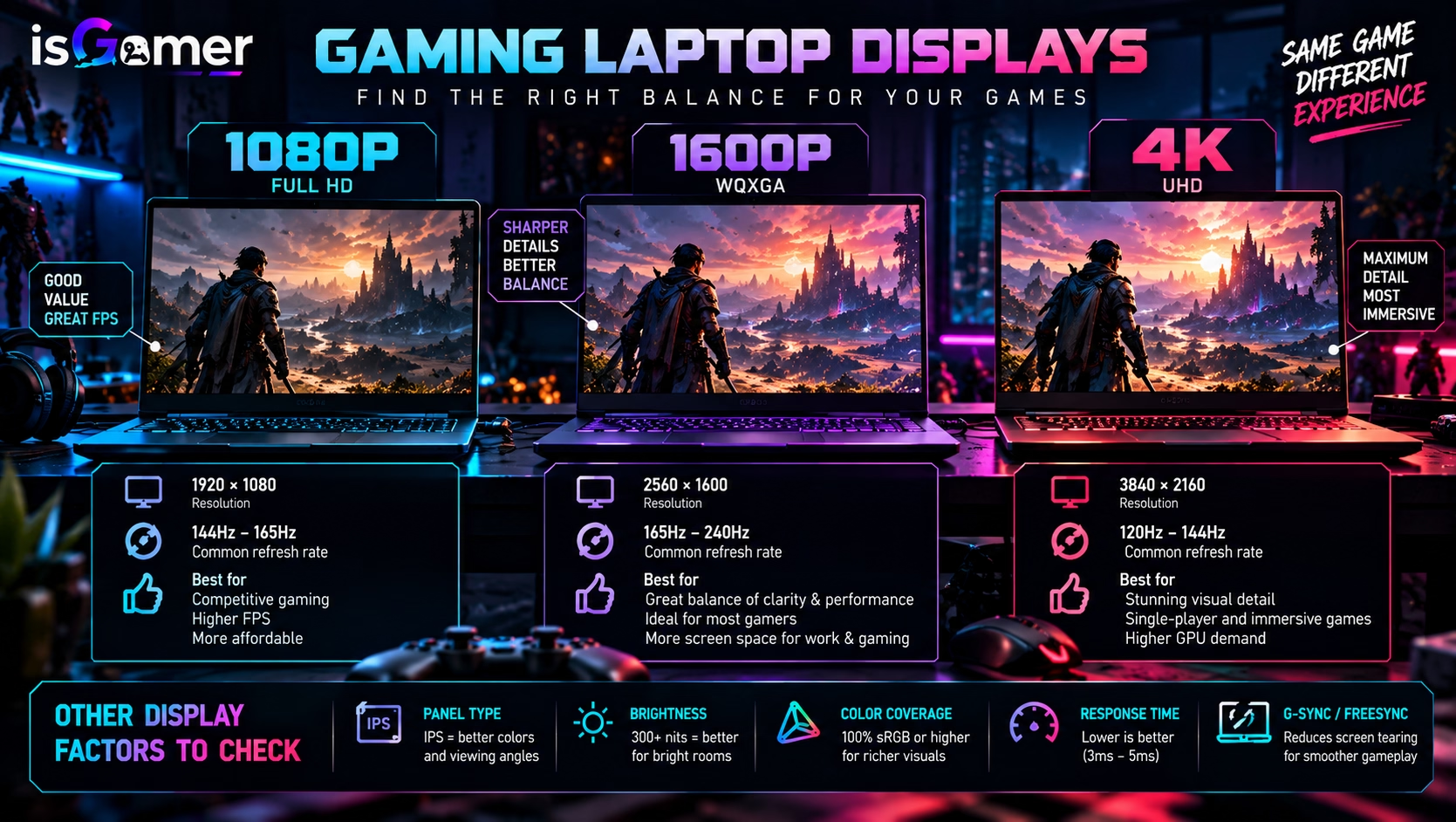
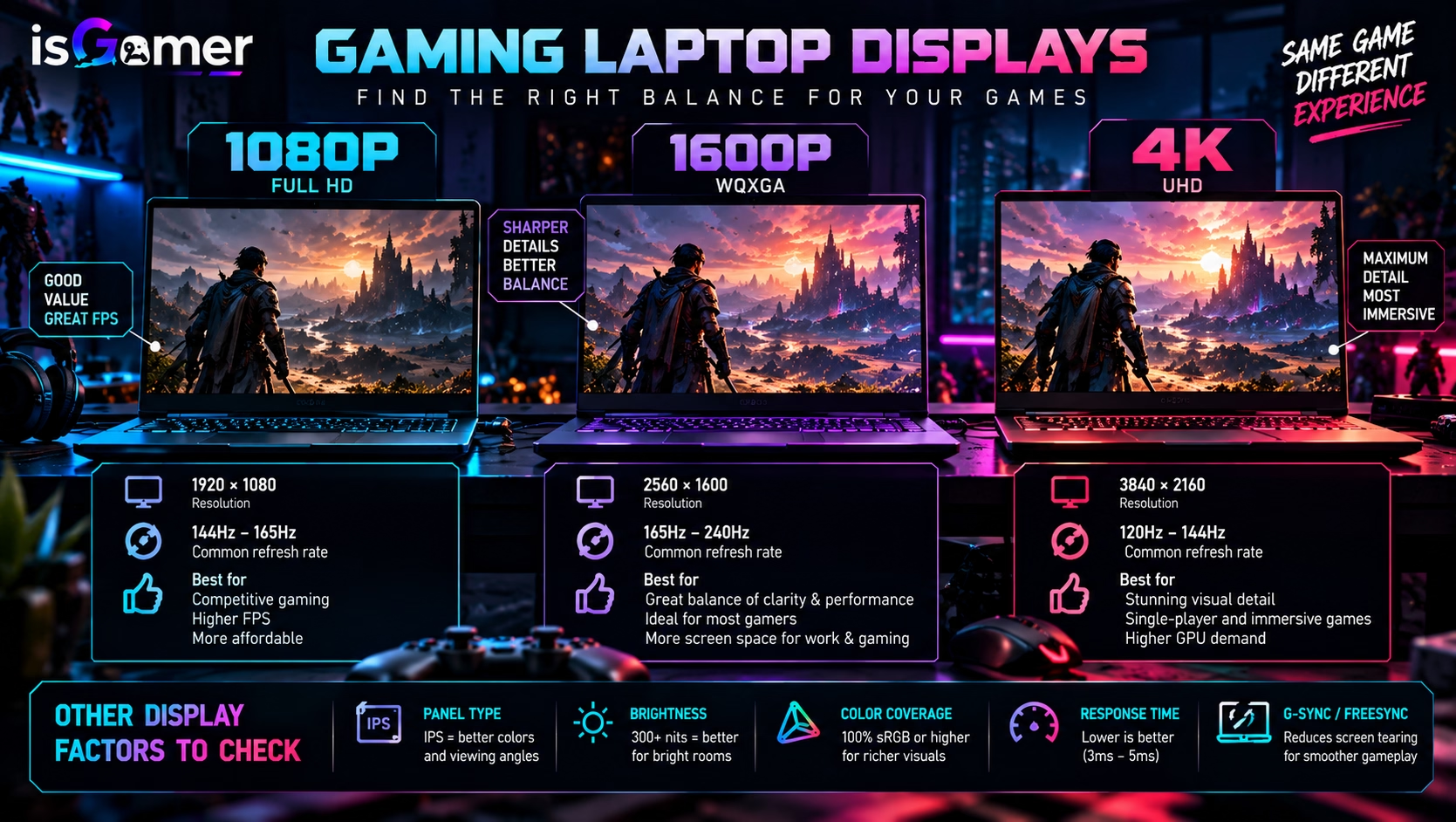
For many gaming laptops, 1920×1080 or 1920×1200 remains a practical choice because it is easier for the GPU to drive at high frame rates. Moving to 2560×1440 or 2560×1600 can improve image clarity, especially on larger 16-inch panels, but it also raises the rendering load.
Intel’s gaming guidance makes the same point: higher-resolution displays can look clearer, but the hardware required to power games at those resolutions can increase cost. The screen and GPU should therefore be treated as a pair rather than separate specs.
Refresh rate matters most when the GPU can keep up
Refresh rate describes how many times per second the display can update the image. A 60Hz panel can refresh up to 60 times per second, while 144Hz, 165Hz, 240Hz, and faster panels update much more frequently.
That can make fast motion look smoother and controls feel more responsive, particularly in competitive shooters, racing games, and other fast-paced titles.
However, a high-refresh display does not create frames on its own. Intel notes that the CPU, GPU, and display have to work together to benefit from higher refresh rates. If a game is running far below the panel’s refresh capability, part of that specification is going unused.
That is why a 240Hz panel makes the most sense when the laptop can deliver high frame rates in the games you actually play. For slower cinematic games, a lower refresh rate paired with better image quality may be a more sensible compromise.
Variable refresh rate can matter more than a bigger Hz number
Variable Refresh Rate, or VRR, lets the display adapt its refresh timing to the frame output from the GPU. The goal is smoother presentation with less visible tearing and fewer timing mismatches.
NVIDIA describes G-SYNC Compatible displays as providing a validated baseline VRR experience, and modern gaming laptops increasingly pair high-refresh panels with VRR support.
When comparing two laptops, do not look only at the maximum refresh rate. Check whether VRR is supported, how it is implemented, and whether the laptop’s graphics configuration can actually take advantage of the panel.
IPS vs OLED: neither is automatically the right answer
Panel technology changes the character of the image as much as resolution and refresh rate.
IPS panels are common in gaming laptops because they can offer good color, wide viewing angles, high refresh rates, and broad availability across different price ranges. They are a safe all-round option when the manufacturer uses a good-quality panel.
OLED displays can provide much deeper blacks, very high contrast, and extremely fast pixel response. That can make dark scenes, HDR content, and visually rich games look more dramatic.
The tradeoffs can include price, different brightness behavior, and the long-term considerations associated with static content on emissive panels. The practical choice depends on whether you prioritize contrast and image quality or a more conventional high-refresh gaming panel at a lower cost.
Brightness and color are easy to overlook
A fast panel is not automatically a good panel.
A dim display can be frustrating in bright rooms, and weak color coverage can make games, photos, and videos look flat even when the laptop is otherwise powerful. That matters especially if the same machine will also be used for content creation.
Manufacturers often advertise color-gamut coverage such as sRGB or DCI-P3. NVIDIA’s 2026 Computex laptop coverage, for example, highlighted 2560×1600 panels with 240Hz refresh rates and 100% DCI-P3 coverage on some current gaming models.
The important lesson is not to chase one number. A balanced display combines resolution, refresh rate, brightness, color, response behavior, and VRR in a way that matches the laptop’s GPU.
Cooling decides how long performance can be sustained
A gaming laptop’s CPU and GPU generate substantial heat under load. The cooling system has to move that heat away from the chips and out of the chassis using heat pipes or vapor chambers, heatsinks, fans, and carefully designed airflow paths.
When the thermal system is well matched to the hardware, the laptop is better positioned to maintain its intended power levels and clock behavior. When cooling is constrained, manufacturers may have to rely on more aggressive fan speeds, lower power targets, or performance modes that trade speed for temperature and noise.
NVIDIA’s WhisperMode is a useful example of this tradeoff. It reduces noise by managing frame rates and graphics settings to improve power efficiency, which in turn reduces the heat that the cooling system has to dissipate.
Thin laptops make harder thermal compromises
Thin gaming laptops can be excellent, but a smaller chassis gives the cooling system less physical space to work with. That affects fan size, heatsink volume, airflow, and how much heat can be moved away from the CPU and GPU.
This does not mean a thicker laptop is automatically faster. Thermal design quality matters more than thickness alone. Some slim machines use advanced vapor chambers, efficient fan layouts, or lower-power GPU configurations to stay within their thermal limits.
The important part is to understand the design goal. A thin 16-inch laptop may prioritize portability, while a heavier model may devote more space to cooling and sustained performance.
Fan noise is part of the buying decision
Cooling performance is not just about temperatures. It is also about acoustics.
A laptop that keeps temperatures under control by running its fans aggressively can be perfectly functional, but it may not be comfortable for every user. Headphones can hide much of the noise while gaming, but constant fan noise is harder to ignore during lighter work.
Look for independent reviews that test the exact configuration you are considering. Manufacturer specifications rarely tell you how a laptop sounds under sustained gaming load.
Performance modes can change the entire experience
Most gaming laptops include several power or thermal profiles, typically ranging from quiet or balanced modes to a maximum-performance setting.
These profiles can change CPU and GPU power limits, fan curves, temperatures, and noise. A laptop that seems loud in its fastest mode may be much more pleasant in balanced mode with only a modest change in real-world gaming performance.
This is another reason not to judge a laptop from a single benchmark. A useful review should explain which performance profile was used and how that mode affects thermals and acoustics.
What display and cooling setup should you target?
For competitive esports, prioritize a responsive 1080p or 1200p high-refresh panel and a cooling system that can keep the CPU and GPU stable during long sessions.
For mainstream AAA gaming, a 1440p-class or 1600p display around 144Hz to 165Hz can offer a strong balance of sharpness and smoothness when paired with an appropriate GPU.
For premium single-player gaming, OLED or high-quality IPS panels with strong contrast, good brightness, wide color coverage, and VRR can matter more than chasing the highest refresh-rate number.
In every case, the cooling system needs to match the CPU and GPU power level. A display specification can look impressive on paper, but the laptop still has to deliver the frame rate and sustain the performance required to make that screen worthwhile.
For the complete buying framework, including GPU power, CPU, memory, storage, display, thermals, ports, and upgradeability, see our Gaming Laptop Buying Guide 2026.
What to check before buying
Before choosing a gaming laptop, check the native resolution, refresh rate, VRR support, panel technology, advertised brightness and color coverage, and whether the screen specification changes between different configurations of the same model.
Then look at the cooling design: number of fans, heat-pipe or vapor-chamber layout when disclosed, performance modes, fan-noise measurements, and whether independent testing shows stable behavior during sustained gaming.
The best gaming laptop display is not simply the one with the highest resolution or refresh rate. It is the one the GPU can drive effectively, inside a chassis that can keep the hardware cool enough to sustain the experience you paid for.
Complete the Gaming Laptop Checklist
Display quality and sustained cooling should be judged alongside the core hardware. Review our complete gaming laptop buying guide, compare GPU power and TGP, and make sure you have enough RAM and SSD storage for the games you actually play.




1 comment